
Tomatoro: pomodoro made easy
Why the pomodoro technique worked, how the cycle goes, and the open source timer that came out of it.

The last side project I was working on is Tomatoro.
At the office, I'm always thinking of how to make my work easier, how to be more productive and how to reduce distractions. One day, I found the pomodoro technique. I tried it with doubt: how might working short time cycles make me more productive?
Well, it did.
I tried that technique for a week. I finished my daily duties in less than four hours instead of six or eight.
How does Tomatoro work?
For each 25 minutes of work, or Tomatoros, take a 5 minute break. After completing 3 Tomatoros, take a longer 15 minute break. Repeat this cycle.
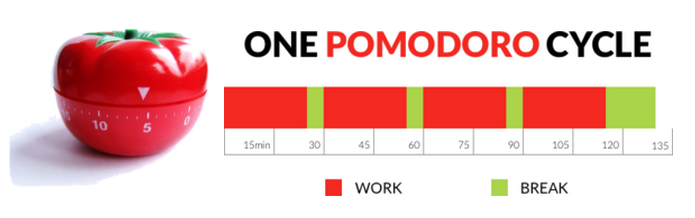
Perhaps the beginning is hard; the result is worth the effort. You need to change how you work, because you need to focus on your task during 25 minutes. Some people start to "get in the zone" after 15 to 20 minutes. Taking a break after reaching that point sounds like a waste of time. But it is not. After the second or third cycle, you can concentrate on what matters more easily than before.
The main point of the pomodoro technique is to have little breaks, so you might relax your mind and your eyes. It is important to avoid looking at your screen or your mobile device, because the stress in your eyes will quickly tire you. Get away from your work station and get fresh air, a coffee or go to the restroom, whatever you need.
Another cool thing about Tomatoro is that you can count how many working cycles you have done. If you write down that number, you can compare your daily results to figure out how much effort a task or activity is taking.
If you are interested in trying it, you can start right now: tomatoro.com. This project is open source - you can read the code and support it by filing bugs you encounter, or helping me add new functionality on GitHub.